Skip & Jump Logic
Hide questions or jump ahead based on what a shopper picks, so each shopper only sees what matters to them.
Skip and jump logic let you branch the quiz flow based on what a shopper selects. Instead of every shopper seeing every question in order, you can hide irrelevant questions or jump past them entirely — creating a personalised path through the quiz.
What is conditional logic?
By default, every shopper goes through every question in sequence. Conditional logic changes this per answer: when a specific answer is selected, the quiz either skips over certain questions or jumps directly to a different one.
Logic is set per answer, not per question. Multiple answers on the same question can carry different logic — each one routing the shopper differently.
Skip logic — hiding future questions
Skip logic hides one or more specific questions when the answer is selected. The shopper never sees those questions, and the votes from those questions are not counted in the final result.
To set skip logic on an answer, expand the answer row, go to the Skip / Jump logic section, select Skip specific questions, and pick the questions to skip. You can select multiple non-contiguous questions — there's no requirement that the skipped questions be adjacent.
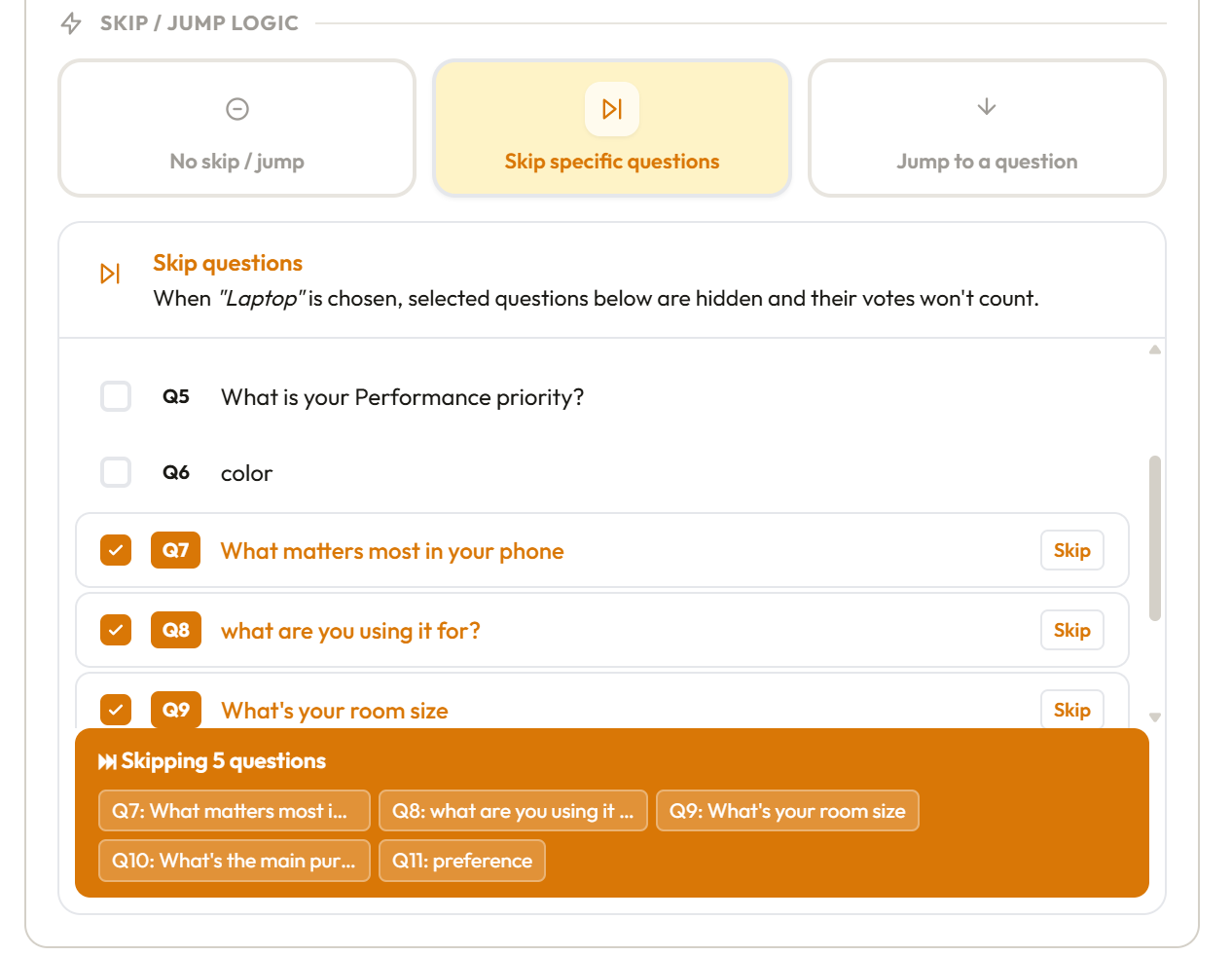
The answer will show a purple SKIP badge in the question list so you can see at a glance which answers carry skip logic.
When votes from skipped questions are not counted: this is intentional and important. If a question is skipped, it means it wasn't relevant to the shopper — counting its votes would distort the result. Skip logic is designed to work together with your vote assignments, not against them.
Jump logic — jumping to a specific question
Jump logic sends the shopper directly to a specific question, bypassing everything in between. When the answer is selected, the quiz skips over all intervening questions and lands on the destination.
To set jump logic, expand the answer row, go to the Skip / Jump logic section, select Jump to question, and choose the destination question. You can only jump to one destination per answer.
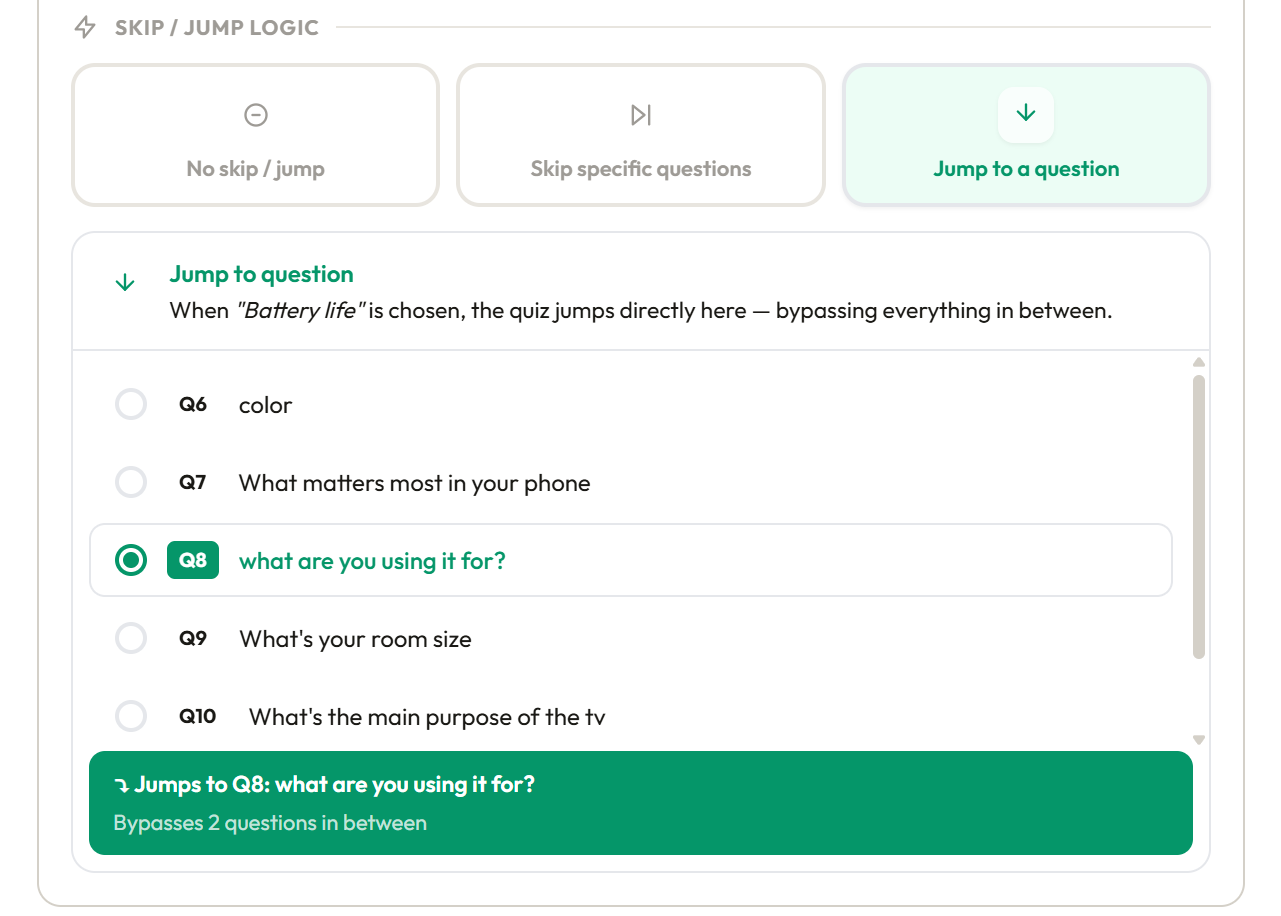
The answer will show a blue JUMP badge in the question list.
Unlike skip logic — which explicitly hides named questions — jump logic bypasses everything between the current question and the destination. Votes from all bypassed questions are not counted.
Skip vs. jump — choosing the right one
Use skip when you want to hide specific questions but the shopper should still see the questions in between. For example: skip Q4 and Q6, but still show Q5.
Use jump when you want to completely bypass a section of the quiz and pick up at a specific point. For example: if the shopper selects "Very short hair" on Q5, jump straight to Q7 because length-related questions in between don't apply.
In practice, jump is simpler to set up and easier to reason about when you're routing shoppers around a whole block of questions. Skip is better when you need surgical removal of specific questions while leaving others in the path.
Rules and limitations
- Skip and jump are mutually exclusive on the same answer. You cannot set both. Setting one clears the other.
- Logic can only move forward — you cannot skip backward to a previous question or jump to a question that appears earlier in the quiz.
- Skip can target multiple questions in one answer. Jump targets a single destination.
- A question can be the target of multiple jump or skip rules from different answers — that's fine.
- The last question in the quiz cannot carry skip or jump logic (there's nowhere to skip or jump to).
Skip and jump on multiple-select questions
On a multiple-select question a shopper can pick several answers, and each can carry different logic. ShopperQuiz uses one simple rule: a question is left out only if every picked answer would leave it out. An answer leaves a question out if it skips that question, or if it jumps past it (to a question further on). An answer with no logic leaves nothing out.
Examples, where a shopper picks answers A and B on Q4:
| A | B | Result |
|---|---|---|
| Skips Q5 | Skips Q6 | Both Q5 and Q6 are shown (each is wanted by one of the answers) |
| Jumps to Q7 | No logic | No jump: the shopper continues to the next question |
| Jumps to Q7 | Jumps to Q5 | Goes to Q5, the nearer destination |
| Skips Q5 | Jumps to Q7 | Q5 is left out (both answers leave it out); Q6 is shown |
Every question the shopper sees counts towards the result: its votes and its filters. On single-select questions nothing changes — the logic of the one picked answer applies.
How skipped questions affect votes
Questions that are skipped — whether by skip logic or by being bypassed through a jump — do not contribute votes to the result. Their vote assignments are simply not run for that shopper.
This means your vote assignments on non-skipped questions carry more weight for shoppers who skip others. Design your quiz so that the questions most shoppers will see have thorough vote assignments covering your full product catalog.
Visual indicators in the question list
Answers carrying logic are marked with badges in the collapsed answer row and in the question list:
- SKIP (purple) — this answer skips specific questions
- JUMP (blue) — this answer jumps to a specific question
These badges make it easy to audit your logic at a glance without expanding every answer row.
Was this page helpful?
Need more help? Open Ask Ana AI in your dashboard, or email support@shopper-quiz.com.